> For the complete documentation index, see [llms.txt](https://docs.zeliot.in/condense/llms.txt). Markdown versions of documentation pages are available by appending `.md` to page URLs; this page is available as [Markdown](https://docs.zeliot.in/condense/v2.4.0/other-features/private-version-control.md).
# Private Version Control
### Overview
Condense supports integration with both **public GitLab (gitlab.com)** and **private/self-hosted GitLab instances**.\
This document describes how to configure Condense to work with a **private GitLab** deployment, using **OAuth 2.0 authentication** for secure repository and branch access.
Private GitLab integration enables:
* Repository access for Condense applications.
* Branch-level validation before pipelines run.
* Cloning source code into Condense build environments.
* Publishing and restoring applications backed by private Git repositories.
### Prerequisites
To integrate a private GitLab instance with Condense:
* **Running GitLab instance**: GitLab CE/EE deployed on-premise or in cloud (e.g., Docker-based EC2 deployment).
* **Domain name**: e.g., `gitlab.company.com`, pointing to the GitLab server.
* **TLS/SSL certificate**: HTTPS endpoint required (Let’s Encrypt, enterprise CA, or self-signed).
* **Admin account** in GitLab.
* **OAuth Application** configured in GitLab, providing:
* **Client ID**
* **Client Secret**
* **Redirect URI** (Condense callback URL)
* **Network access**: Condense backend services must be able to reach your GitLab endpoint over HTTPS.
### Roles and Scopes in Private GitLab
#### Roles
* Guest → Limited visibility; cannot pull or push repository code.
* Reporter → Can pull repository content; cannot push.
* Developer → Can push commits, create branches (subject to branch protections).
* Maintainer → Full project control, including branch and merge request management.
* Owner → Administrative control at the group level.
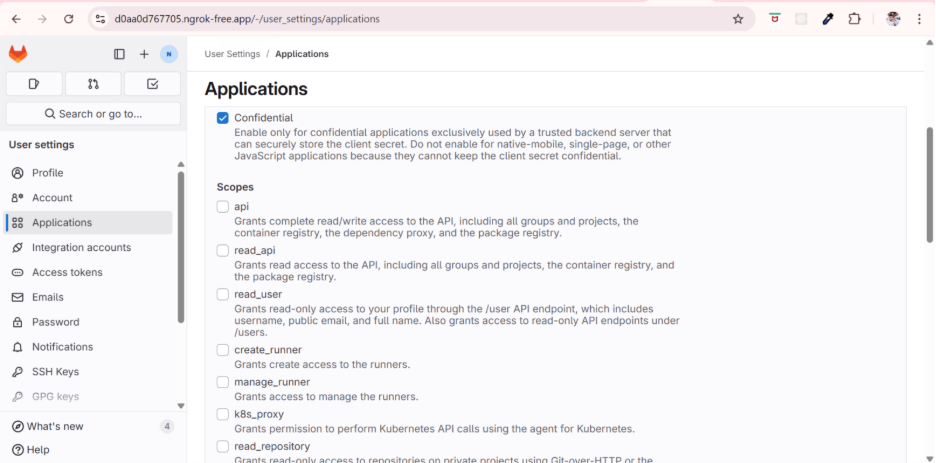
#### Scopes
* read\_api → Allows Condense to query projects, groups, and metadata.
* read\_repository → Allows Condense to fetch repository contents.
* write\_repository (optional) → Allows Condense to push commits or update commit statuses if the user role permits it.
#### Effective Access
A user’s access = Role ∩ Scope ∩ Branch Protections.
Examples:
* Guest + read\_repository → cannot access repo contents (role blocks it).
* Reporter + read\_repository → can fetch repository code.
* Developer + read\_repository + write\_repository → can fetch and push, if branch rules allow.
* Maintainer + all scopes → full repository access, still subject to branch rules.
* Non-member → cannot link repositories, regardless of scopes.
### GitLab Configuration
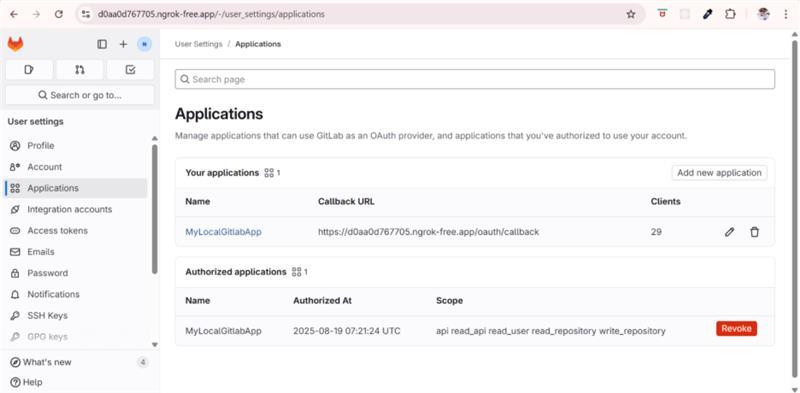
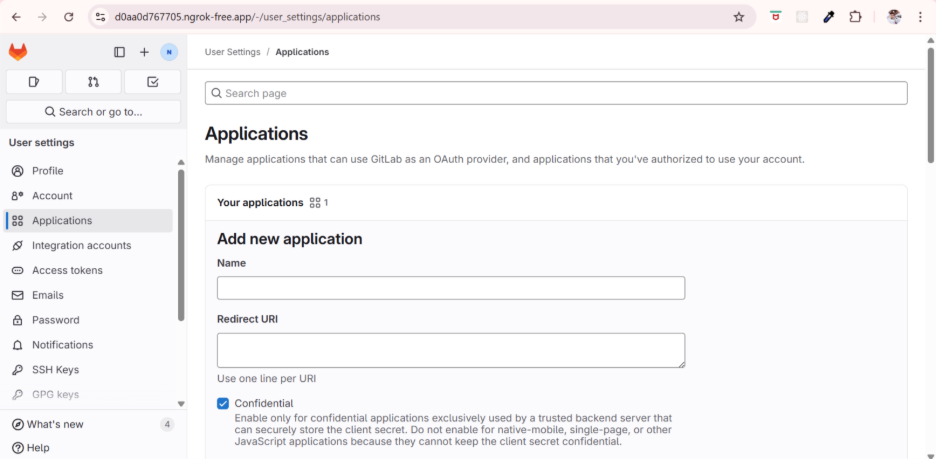
#### Create OAuth Application in GitLab
1. Log in to your private GitLab instance as an administrator.
2. Navigate to **Admin Area → Applications**.
1. Select **New Application** and provide the following:
* **Name**: Condense Integration
* **Redirect URI**:
* **Scopes**: select `api`
2. Save and note the generated **Client ID** and **Client Secret**.
Reference: GitLab OAuth Applications
Defining the scope of the application
### Condense Configuration
#### Provider Registration (Admin Only)
Private GitLab instances must be registered in Condense by an organization admin.
| Field | Description | Example |
| ---------------- | ------------------------------------------- | ---------------------------------------------------------------------------------------------- |
| **vcProvider** | Provider identifier | `gitlab` |
| **url** | Base URL of the GitLab instance | `https://gitlab.company.com` |
| **redirectUri** | Callback URI for OAuth exchange | [`https://central-tower-dev.zeliot.in/redirect`](https://central-tower-dev.zeliot.in/redirect) |
| **clientId** | Client ID from GitLab OAuth application | `abc123...` |
| **clientSecret** | Client Secret from GitLab OAuth application | `********` |
Configuration is stored in the `vc_provider_config` table and can be added via API:
```http
POST /version-control/createVcProviderConfig
```
#### User Authentication Flow
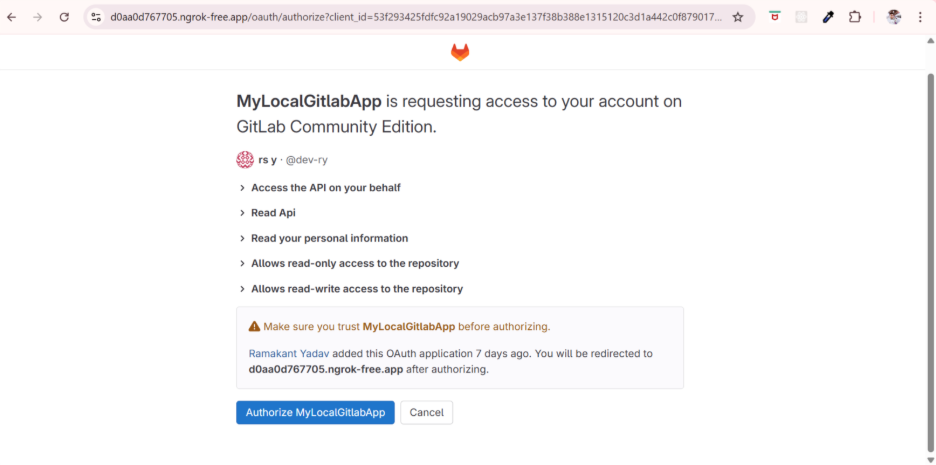
1. User initiates login with GitLab in Condense.
2. Condense redirects the request to the private GitLab OAuth endpoint:
```
https://central-tower-dev.zeliot.in/redirect
```
3. GitLab issues an authorization code.
4. Condense exchanges the authorization code for an access token:
```
POST https://central-tower-dev.zeliot.in/redirect
```
5. Condense stores the access and refresh tokens in `vc_auth_details`.
6. Token refresh is handled automatically using Client ID and Client Secret.
### Application Lifecycle with Private GitLab
Condense integrates private GitLab repositories across the entire application lifecycle:
| Phase | Action |
| ------------------------ | ------------------------------------------------------------------------ |
| **Application Creation** | Application created in draft state, without version control attached. |
| **Configure Repository** | User selects GitLab repo + branch; Condense stores mapping. |
| **Validate Access** | Condense calls `/checkUserHasRepoAndBranchAccess` to verify permissions. |
| **Clone Repository** | Condense clones the repo into its build container using OAuth token. |
| **Publish Application** | Application validated and published as a connector. |
| **Restore Application** | Condense re-clones the repository from GitLab when restoring. |
### Configuration Example
A typical provider configuration payload for private GitLab:
```json
{
"vcProvider": "gitlab",
"url": "https://gitlab.company.com",
"redirectUri": "https://central-tower-dev.zeliot.in/redirect",
"clientId": "1234567890abcdef",
"clientSecret": "abcdef1234567890"
}
```
### Restrictions
* Only **HTTPS endpoints** supported; plain HTTP is not allowed.
* Authentication supported only via **OAuth 2.0**. SSH keys and basic authentication are not supported.
* Repository and branch visibility is determined entirely by GitLab RBAC. Condense does not override GitLab permissions.
* GitLab API rate limits apply (default: \~600 requests/minute per token).
### Controls
* **Admin Control**: Only admins can register a private GitLab instance in Condense.
* **Org-Scoped Configs**: Configurations are stored at the organization level.
* **Access Enforcement**: Users only see repositories and branches they are authorized for in GitLab.
* **Token Lifecycle**: Tokens are encrypted, refreshed automatically, and revocable by admins.
* **Audit Logging**: All VCS interactions (auth, repo fetch, branch validation, clone) are logged.
### Best Practices
* Minimize scope selection — default to read-only unless write access is justified.
* Use Protected Branches to enforce push/merge policies, regardless of Condense integration.
* Educate users: scopes = APIs allowed; roles = actual repository permissions.
* Audit Condense-linked repositories quarterly for compliance.
* Keep Condense as a consumer of repository data; governance remains in GitLab.
### Troubleshooting
| Issue | Resolution |
| -------------------------- | ------------------------------------------------------------------ |
| **401 Unauthorized** | Verify Client ID/Secret; check token refresh. |
| **Repository not visible** | Confirm user permissions in GitLab. |
| **Branch access denied** | Check GitLab branch-level RBAC. |
| **SSL errors** | Verify certificate validity and Nginx reverse proxy config. |
| **Rate limit exceeded** | Reduce API polling frequency; consider higher API quota in GitLab. |
### References
* [GitLab OAuth Applications](https://docs.gitlab.com/integration/oauth_provider/)
* [GitLab REST API](https://docs.gitlab.com/api/)
* [Private GitLab Setup Guide](https://zeliotinc-my.sharepoint.com/:b:/g/personal/rakesht_zeliot_in/ERabfPdy-VJMrz8uEbdJrqgB9Co80jrNYTvzNslVosDvqQ?e=KSbb8l)
* [Condense Private Version Control – Technical Reference](https://zeliotinc-my.sharepoint.com/:b:/g/personal/rakesht_zeliot_in/EXm7SK7A7SpPjoc-tfT3rHMBvS_sL7TbFJCUSNM4hvPtlQ?e=vz8tHz)