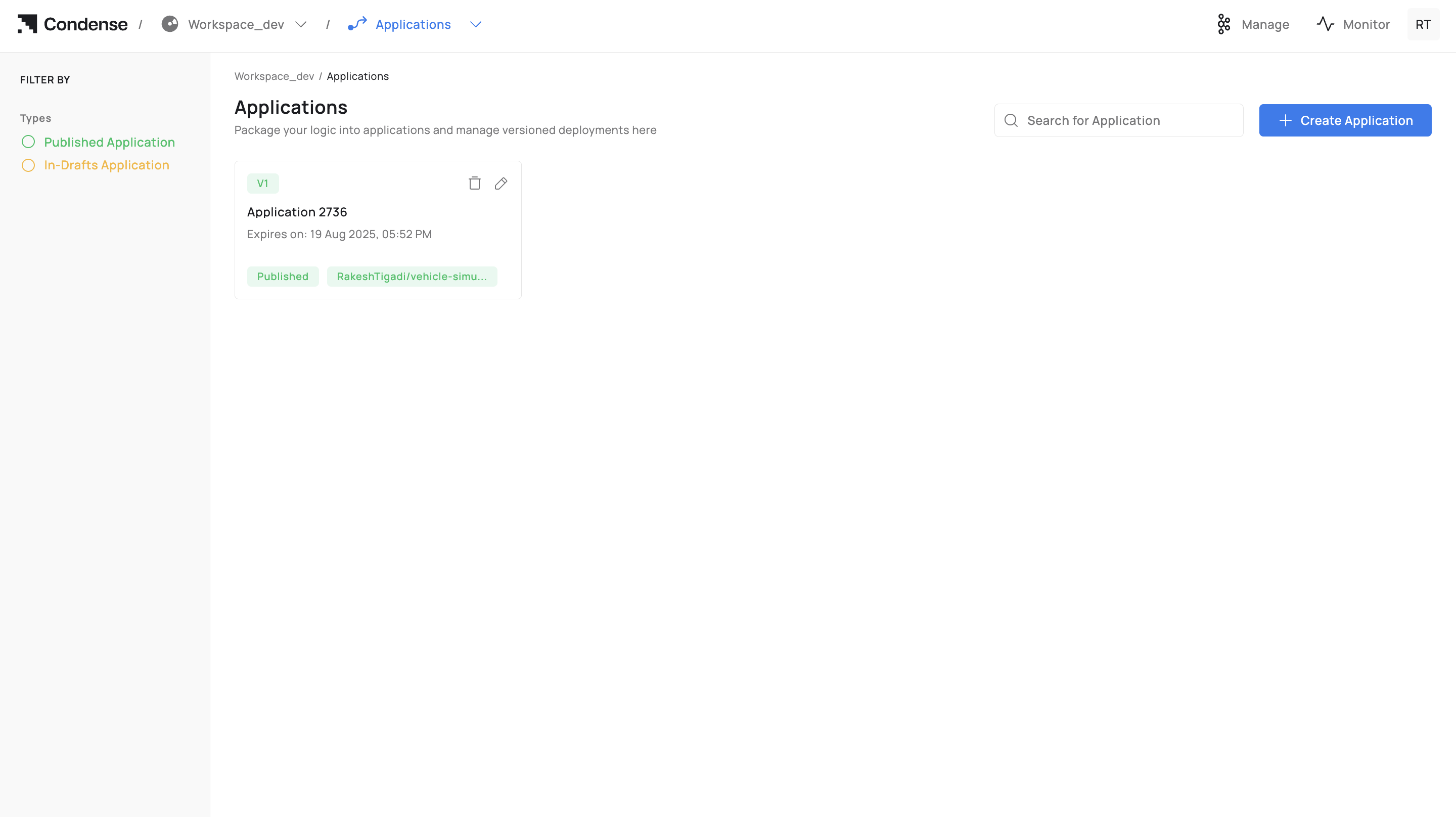
# Applications

## Overview&#x20;

An Application in Condense is a custom, code‑based unit developed in the built‑in IDE and version‑controlled through Git. Once built and published, an application becomes deployable as a Custom Transform or a Custom Connector (Input or Output) within a workspace pipeline.&#x20;

Applications help:&#x20;

* Implement domain‑specific processing or integrations when prebuilt options are insufficient.&#x20;
* Keep logic close to the data path and governed by workspace roles.&#x20;
* Maintain traceability through Git commits, image tags, and published versions.&#x20;
* Standardize development‑to‑deployment through a single, auditable workflow.&#x20;

## What You Can Do in Applications&#x20;

### Create, Develop, and Test&#x20;

* Create an Application from a connected Git repository or start from a template.&#x20;
* Edit code in the IDE (file explorer + code editor) and commit to Git.&#x20;
* Configure ENVs (environment variables) for build/runtime.&#x20;
* Optionally expose HTTP(s)/TCP servers for service testing.&#x20;
* Use Publish/Subscribe testers to validate I/O against workspace topics.&#x20;

### Build and Publish&#x20;

* Build the Application into a container image (image name + tag) with live build logs.&#x20;
* Publish the Application as:&#x20;
* Custom Transform (processing component in pipeline), or&#x20;
* Custom Connector: Input or Output (integration component listed with connectors).&#x20;

### Operate and Maintain&#x20;

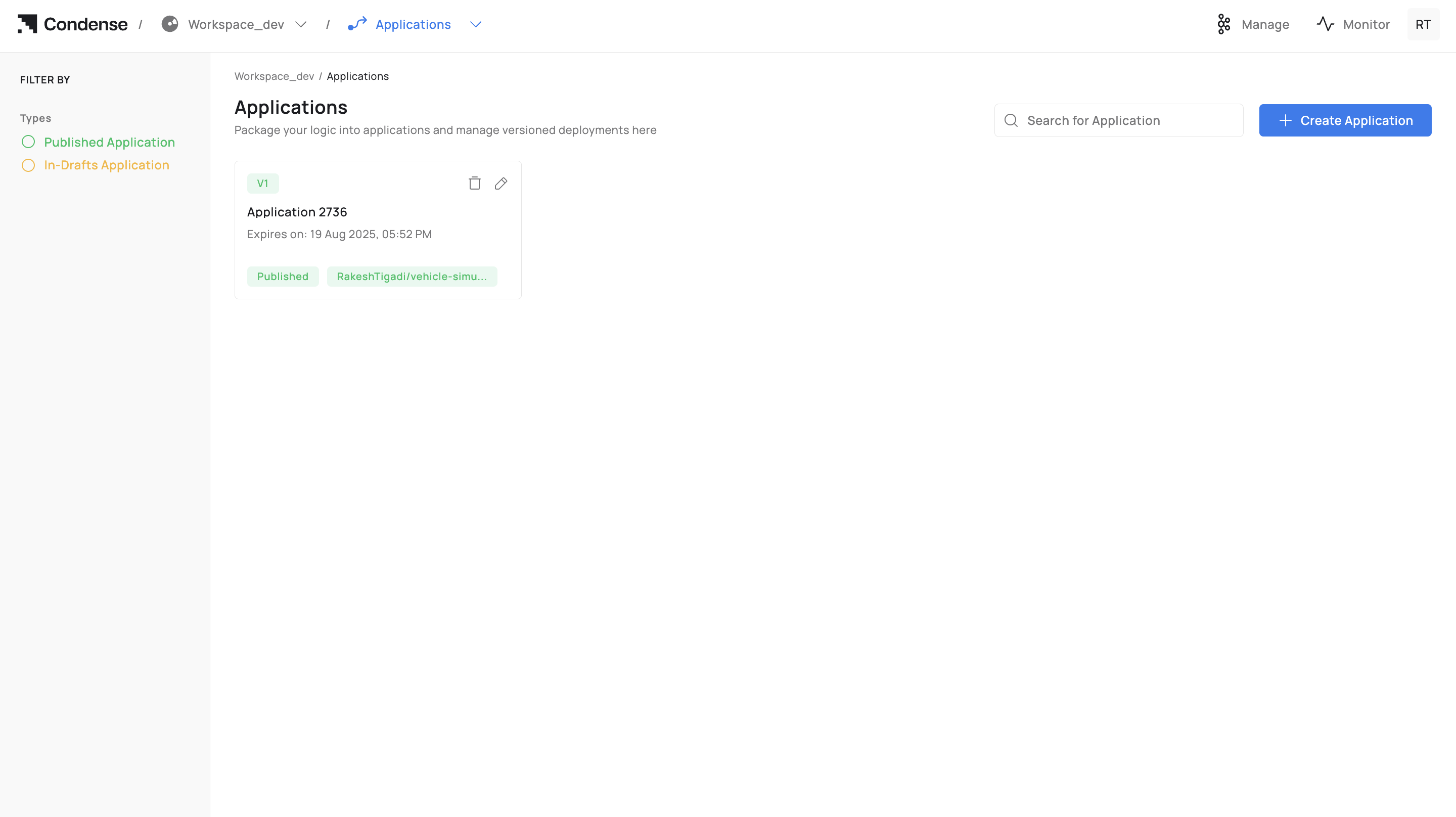
* View versions (draft and published) with immutable release history.&#x20;
* Roll back by selecting an earlier published version at deployment time.&#x20;
* Delete drafts or published Applications (role‑gated; irreversible in Condense).&#x20;

## Applications Lifecycle&#x20;

Every Application follows a clear lifecycle, from creation and development to build, publish, deployment, iteration, and eventual deletion. This section outlines each stage and who can perform it.&#x20;

### 1) Creating an Application&#x20;

{% hint style="info" %}
**Who can create**: Workspace Admins, Maintainers, Developers&#x20;
{% endhint %}

Steps to follow while creating an application:&#x20;

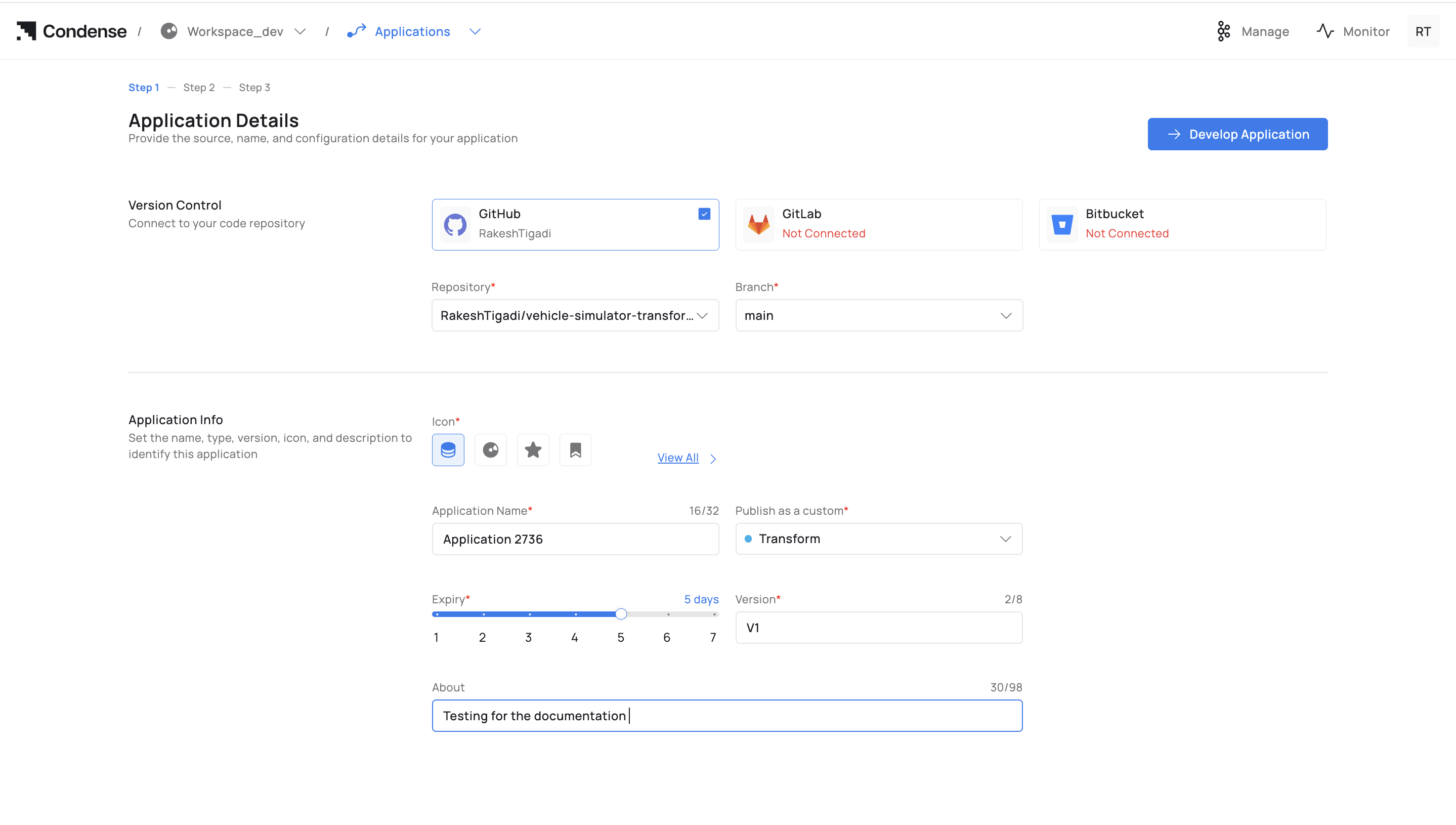
1. Go to Applications → Create Application.&#x20;

<div data-with-frame="true"><figure><img src="https://content.gitbook.com/content/rwKRGO3QthZ6EMqqYblg/blobs/rGN9UAcWZPo6RbVG56Ay/image.png" alt=""><figcaption></figcaption></figure></div>

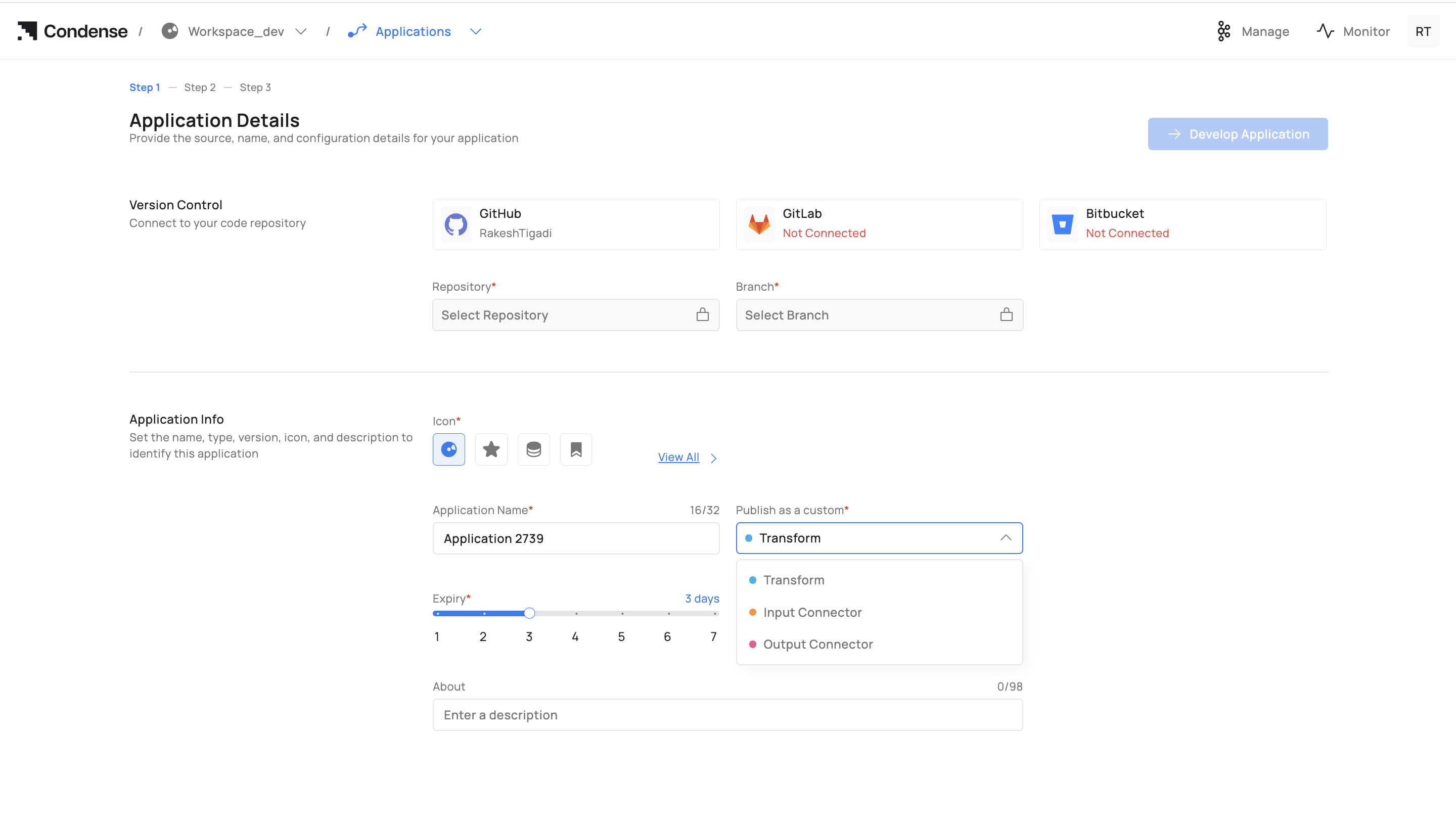
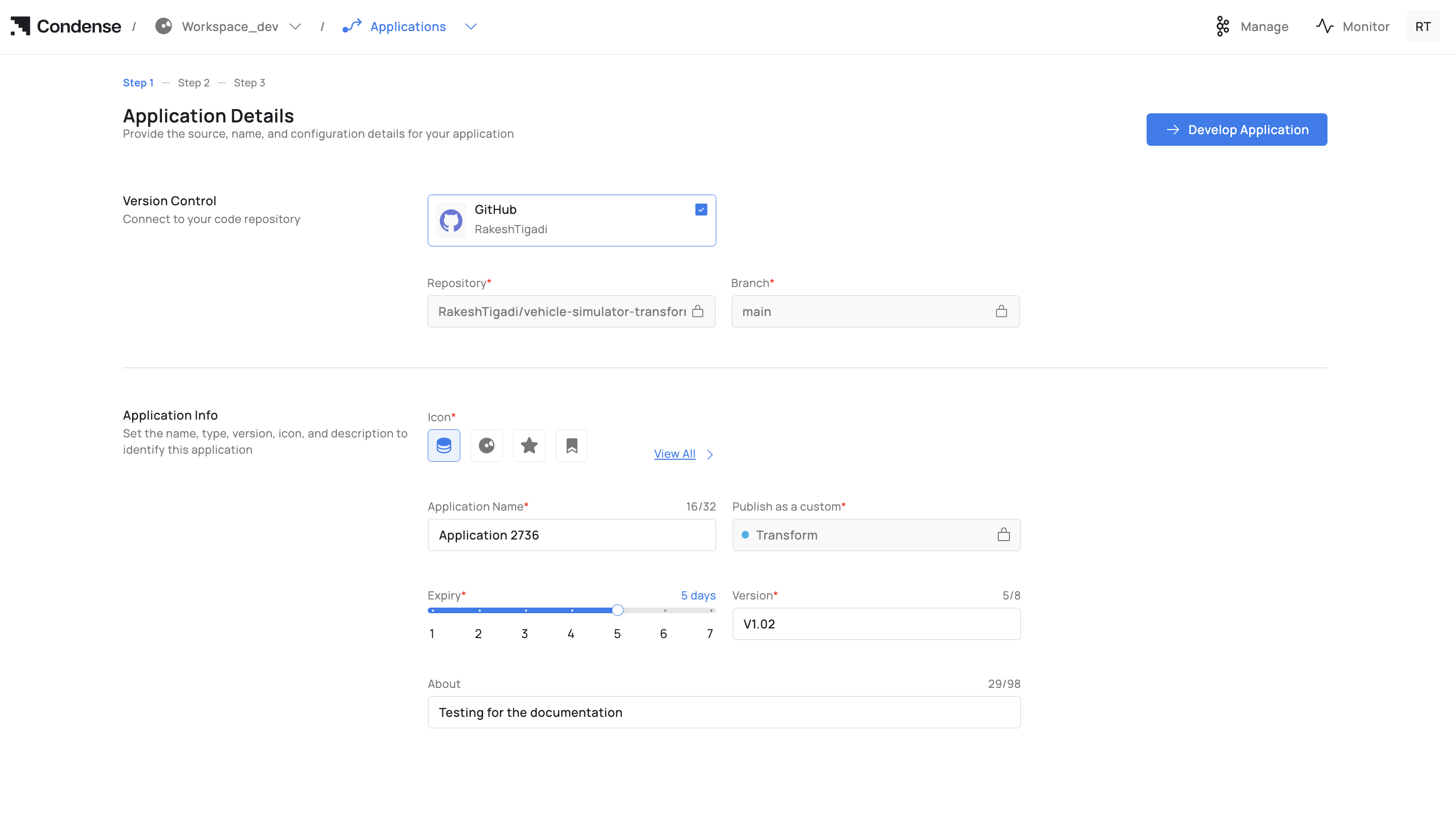
2. Version Control: Connect a provider (GitHub/GitLab/Bitbucket), then select Repository and Branch.&#x20;
3. Application Info:&#x20;
4. Icon (optional)&#x20;
5. Application Name (unique within workspace)&#x20;
6. Publish as a custom: Transform, Input Connector, or Output Connector&#x20;

<div data-with-frame="true"><figure><img src="https://content.gitbook.com/content/rwKRGO3QthZ6EMqqYblg/blobs/1o3sGo6AtRk5nmjq5Nm3/image.png" alt=""><figcaption></figcaption></figure></div>

7. Expiry (draft retention period)&#x20;
8. Version (e.g., v1, v1.1.0)&#x20;
9. About (optional description)&#x20;
10. Click Develop Application to open the IDE.&#x20;

For field‑by‑field info: see Configuration Parameters → A. Creation (Step 1).&#x20;

### 2) Develop in the IDE&#x20;

{% hint style="info" %}
**Who can edit (drafts)**: Admins, Maintainers, Developers&#x20;
{% endhint %}

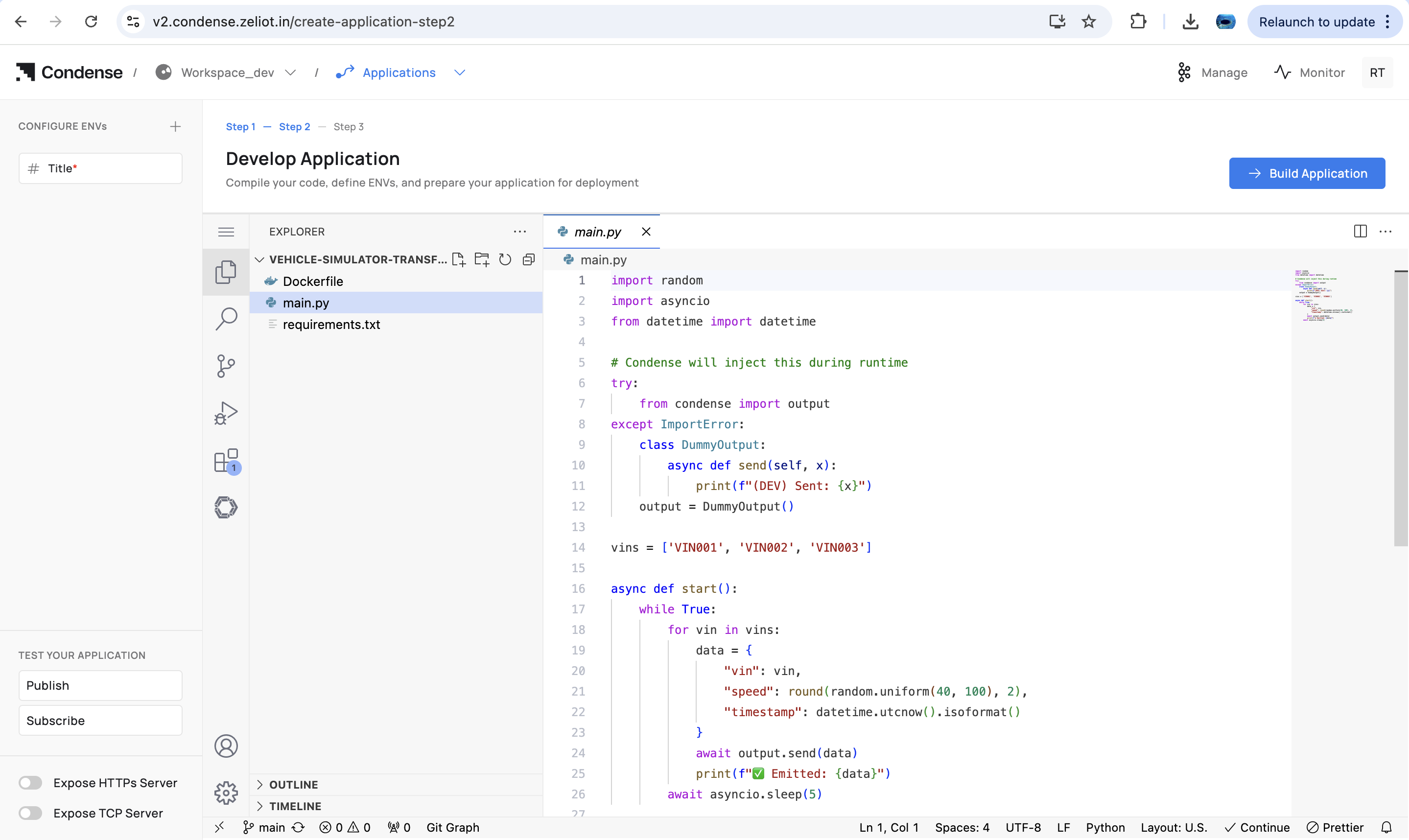
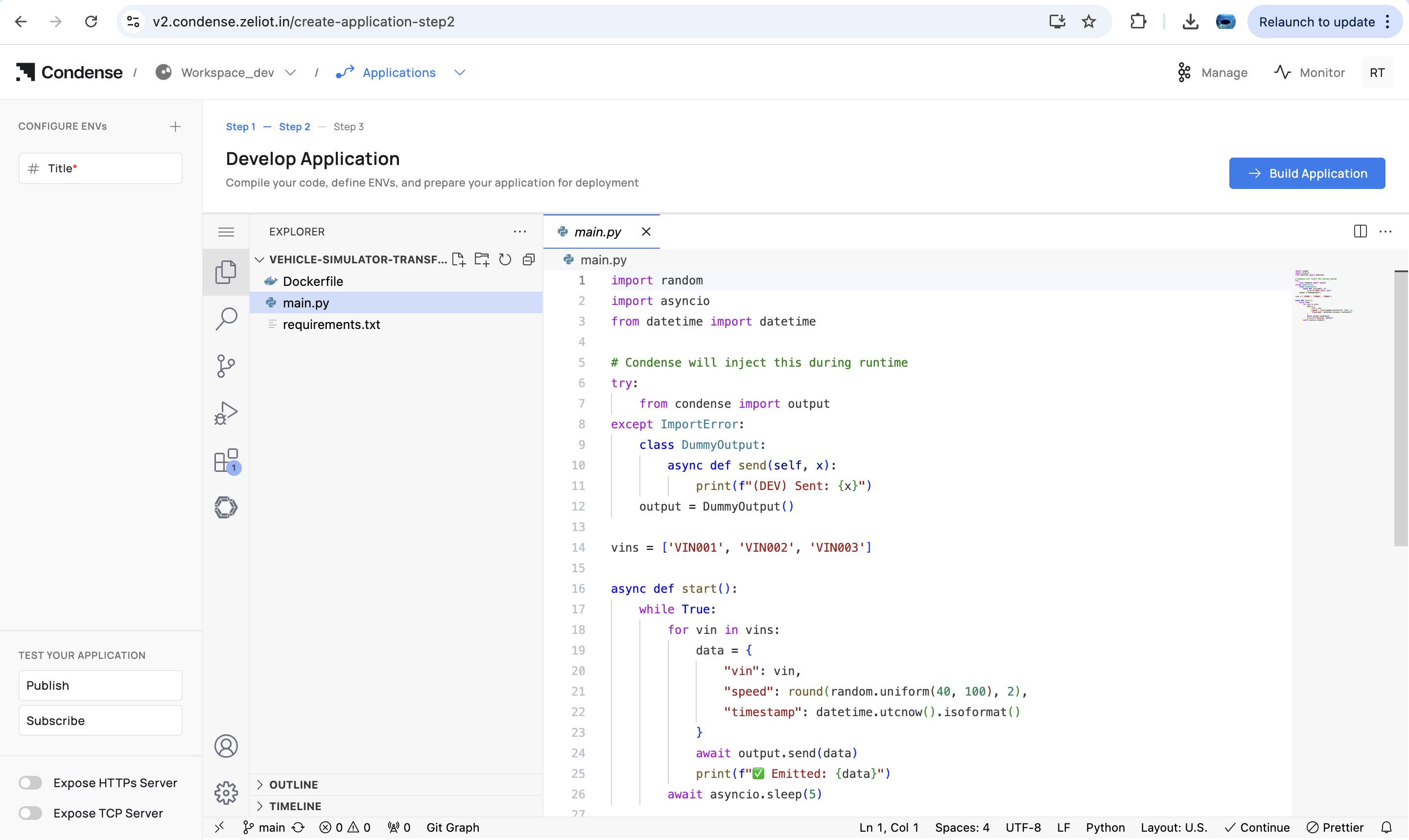
* Navigate/edit code via File Explorer and Code Editor.&#x20;
* Configure ENVs (build/runtime).&#x20;
* (Optional) Enable Expose HTTP(s) Server / Expose TCP Server for local testing.&#x20;
* Validate topic flow with Publish and Subscribe testers.&#x20;
* Commit and push to the connected repository.&#x20;

<div data-with-frame="true"><figure><img src="https://content.gitbook.com/content/rwKRGO3QthZ6EMqqYblg/blobs/uy4YRLAKCaDsBw3bxmuG/image.png" alt=""><figcaption></figcaption></figure></div>

Capabilities and limits: see Editing an Application and IDE Structure.&#x20;

### 3) Build the Application&#x20;

{% hint style="info" %}
**Who can build:** Admins, Maintainers, Developers&#x20;
{% endhint %}

Steps to build an application:&#x20;

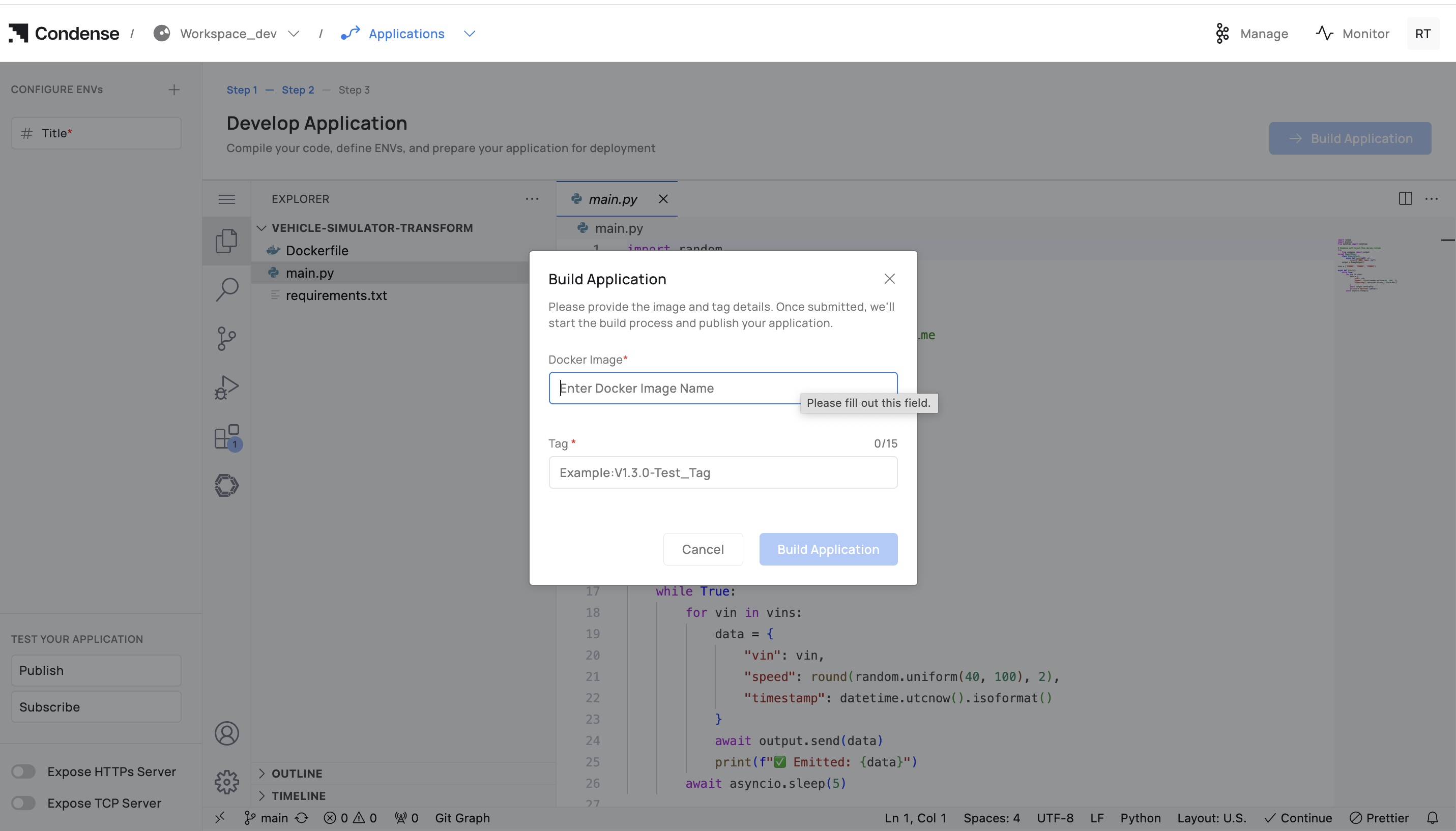
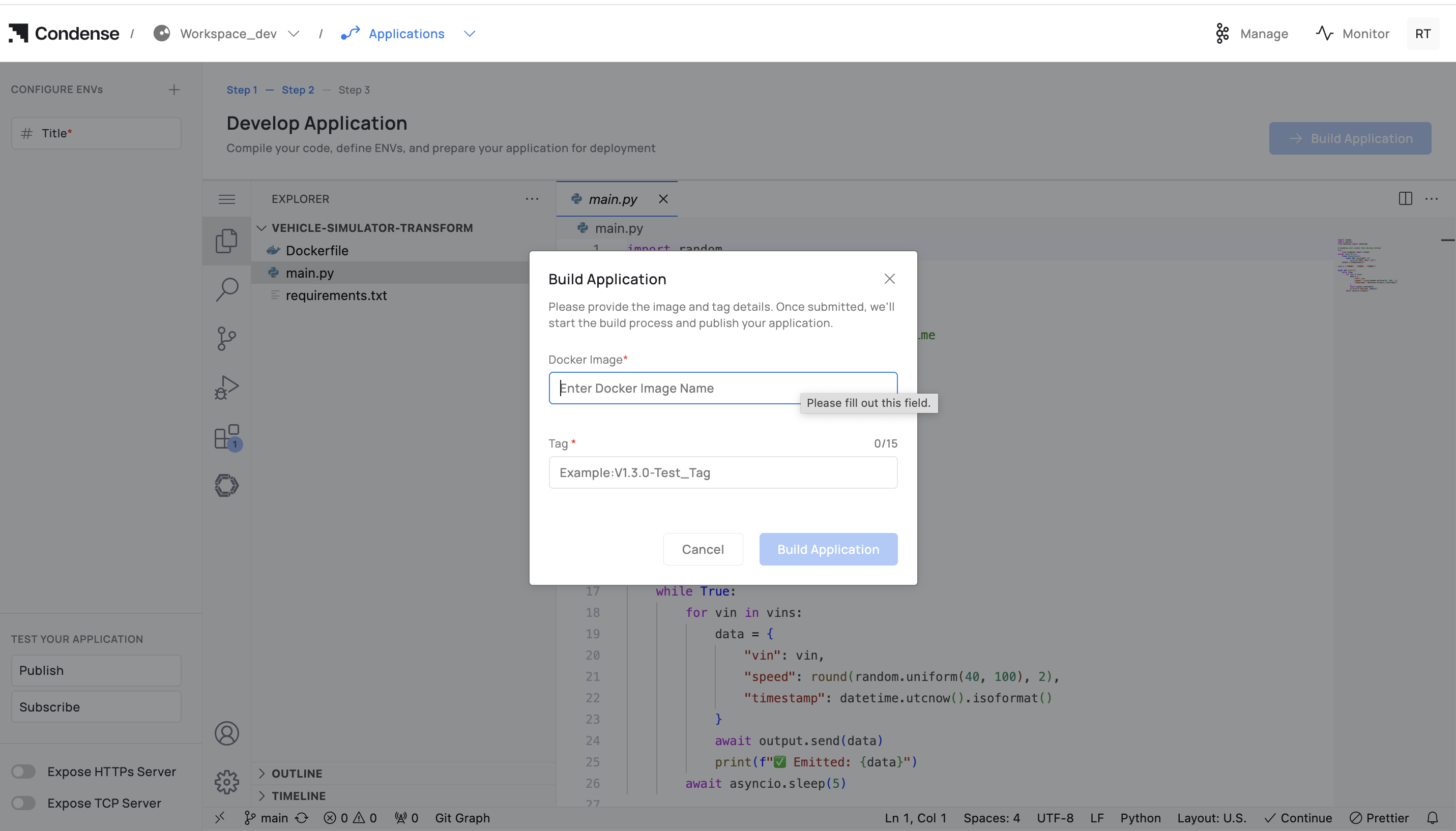
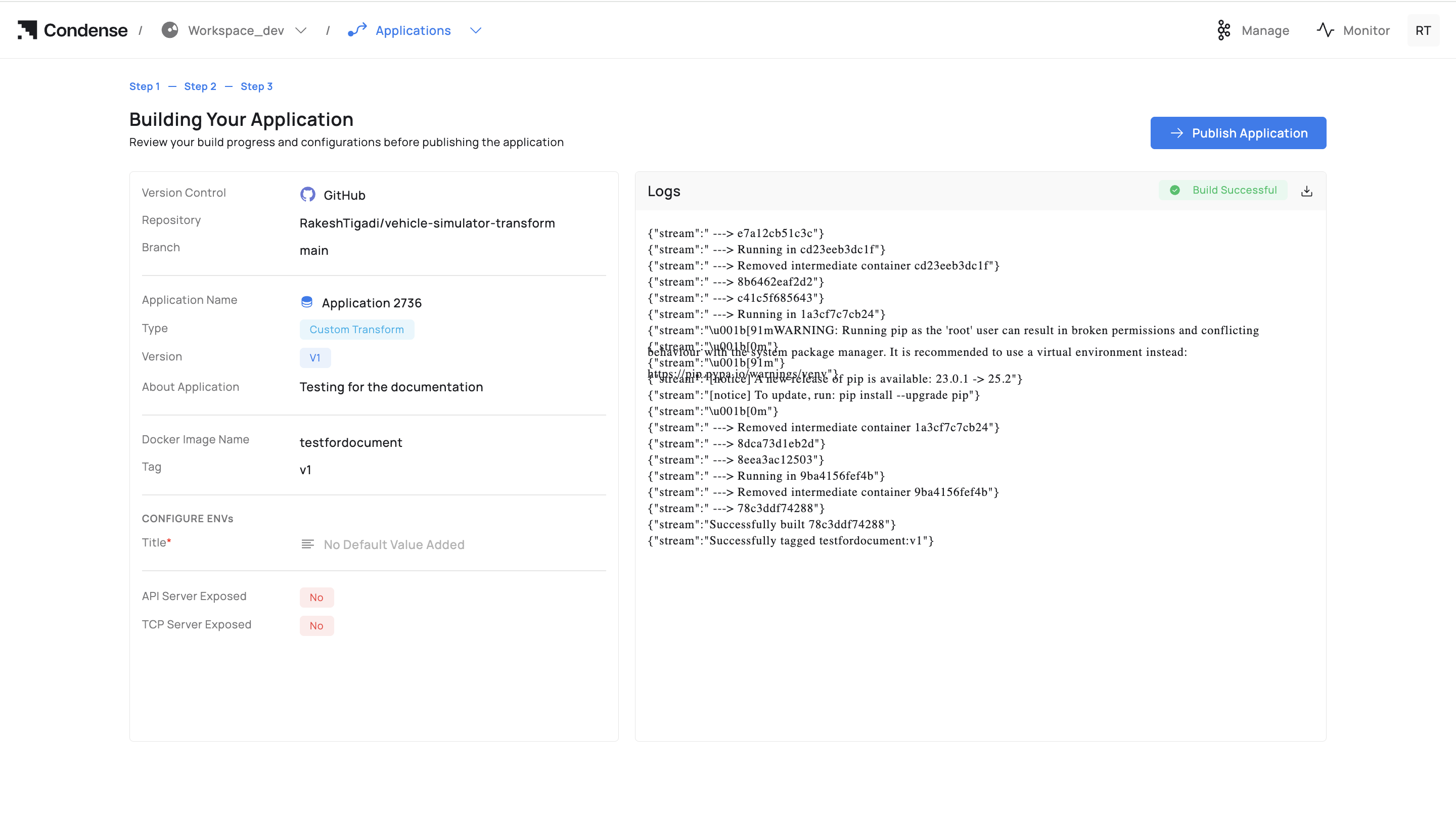
1. Click Build Application.&#x20;
2. Enter Docker Image Name (registry path) and Tag.&#x20;
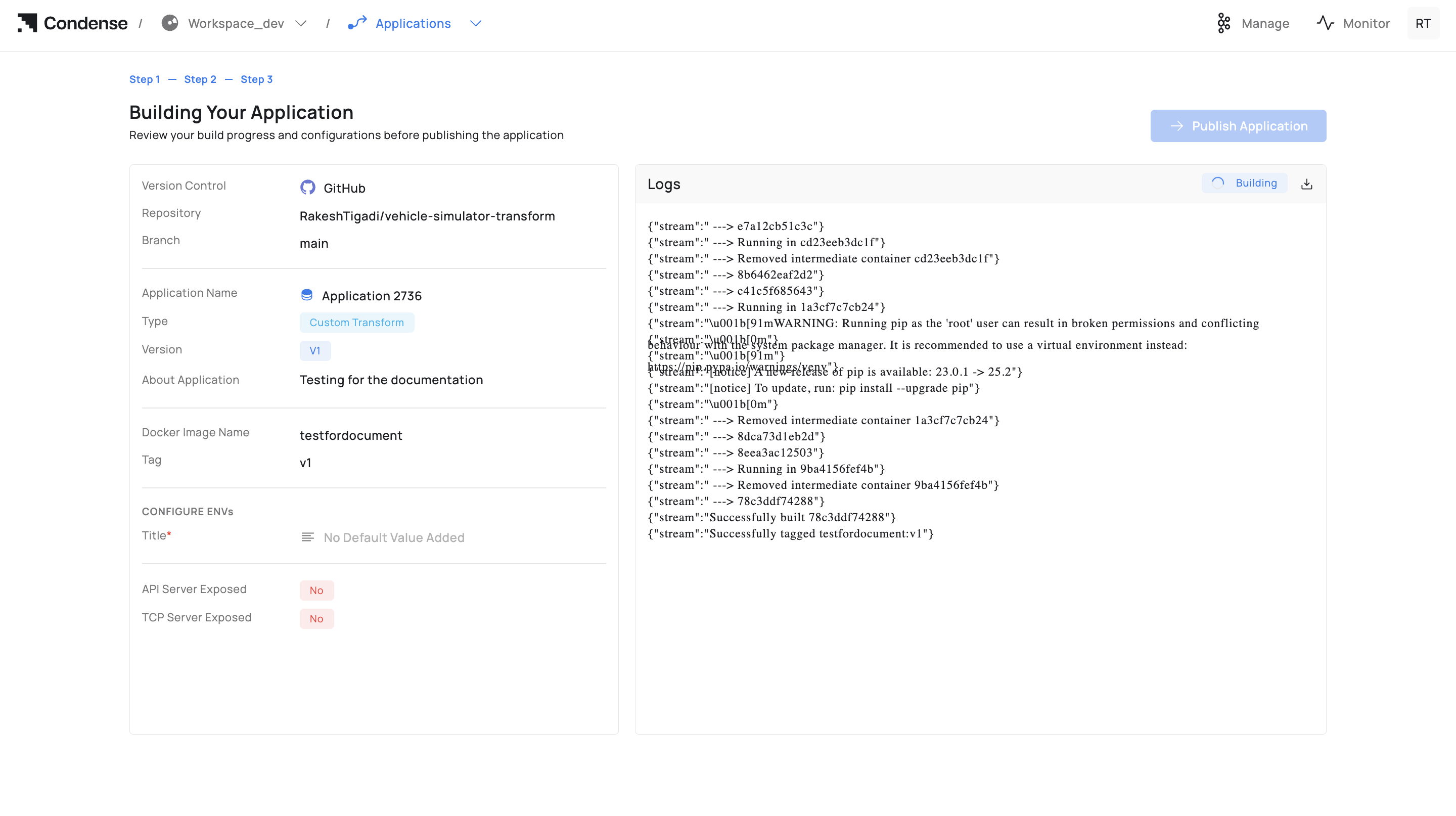
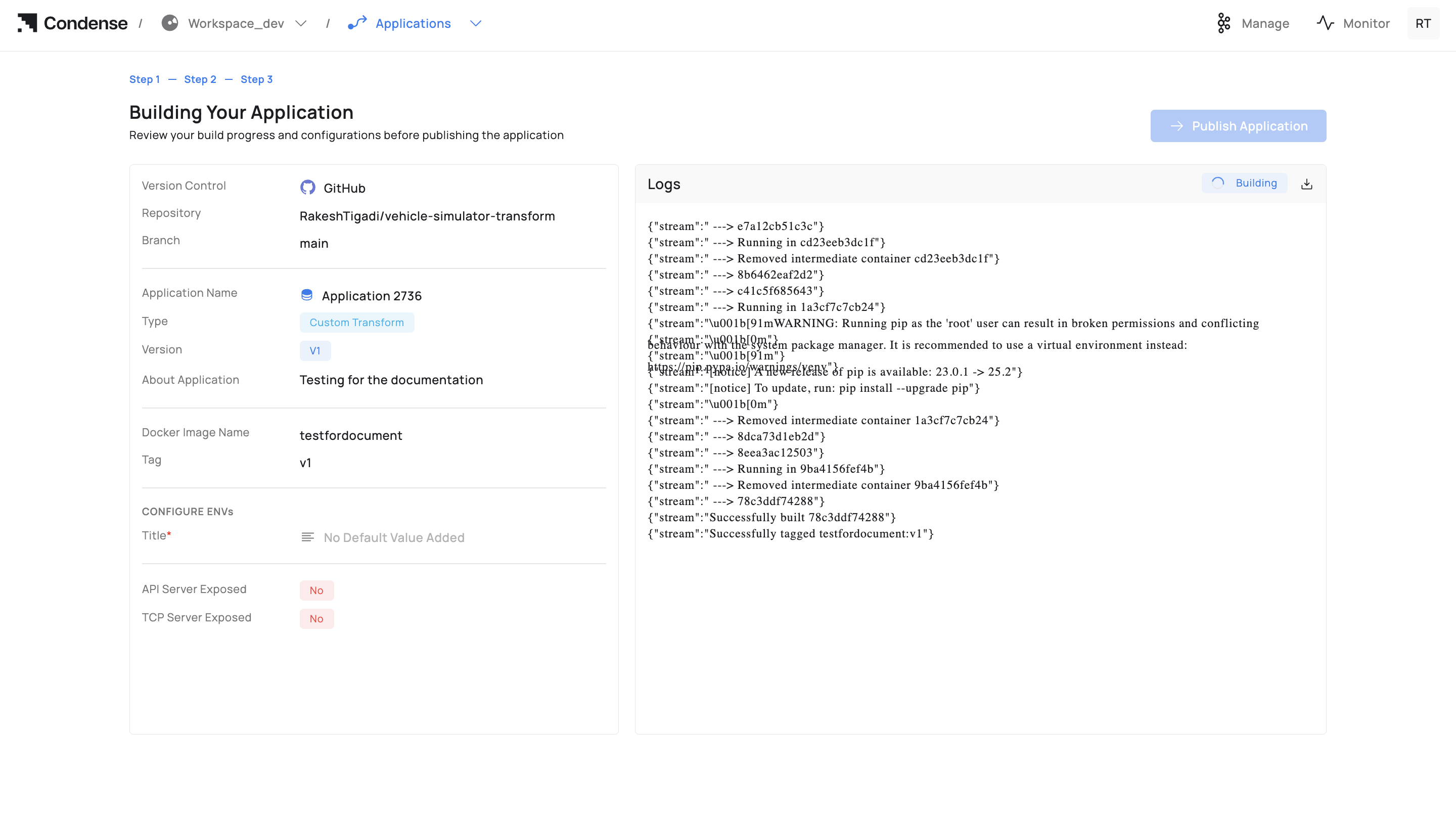
3. Start building and monitor Build Logs; fix errors and rebuild if needed.&#x20;

<div data-with-frame="true"><figure><img src="https://content.gitbook.com/content/rwKRGO3QthZ6EMqqYblg/blobs/0JK6wzPbiVFw3BVHeKJ3/image.png" alt=""><figcaption></figcaption></figure></div>

<div data-with-frame="true"><figure><img src="https://content.gitbook.com/content/rwKRGO3QthZ6EMqqYblg/blobs/hEuynt2GjMLGwvgq98MH/image.png" alt=""><figcaption></figcaption></figure></div>

Guidance on naming/registries: Read [Building an Application. ](#building-an-application)

### 4) Publish the Application&#x20;

Who can publish: Admins, Maintainers&#x20;

Publish targets:&#x20;

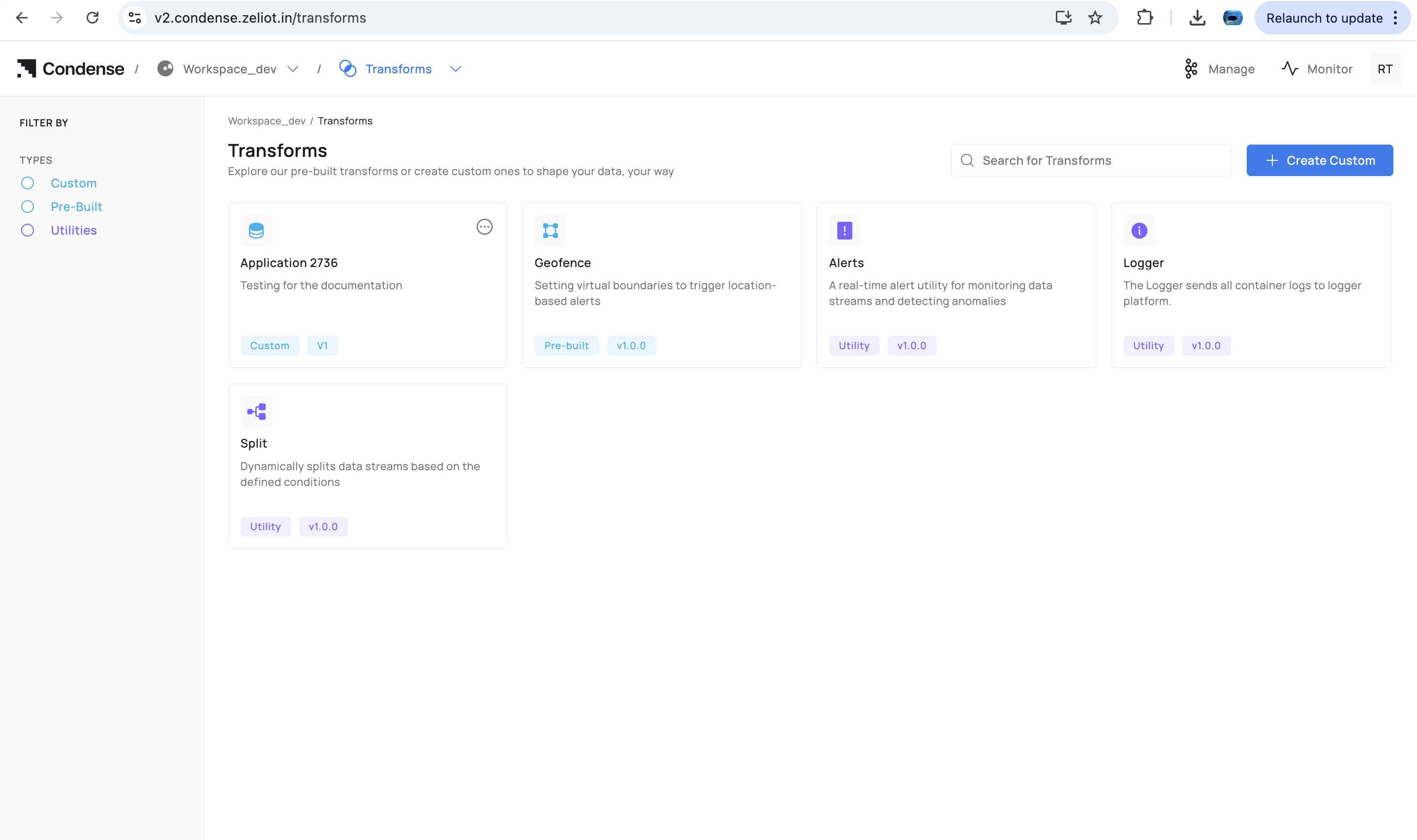
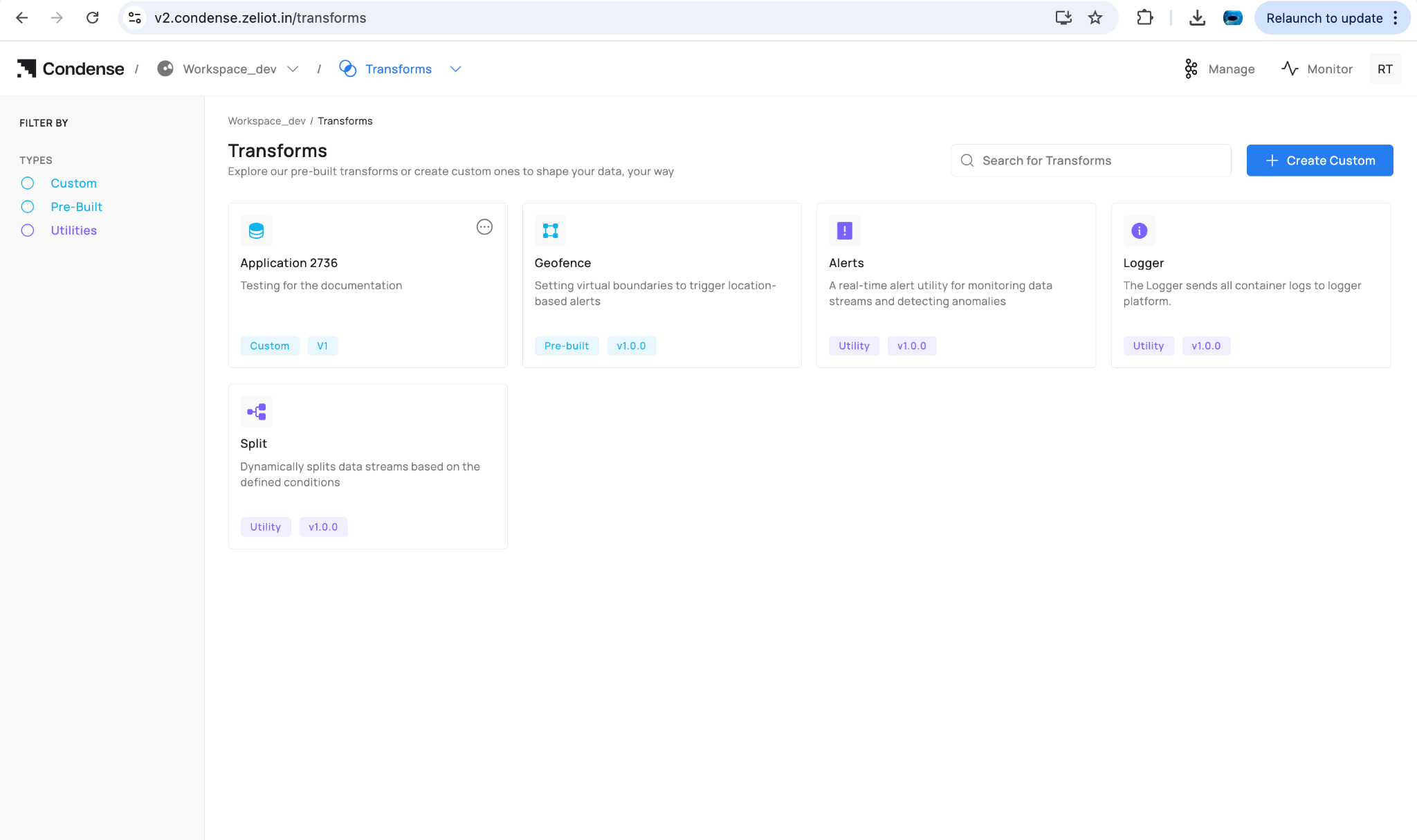
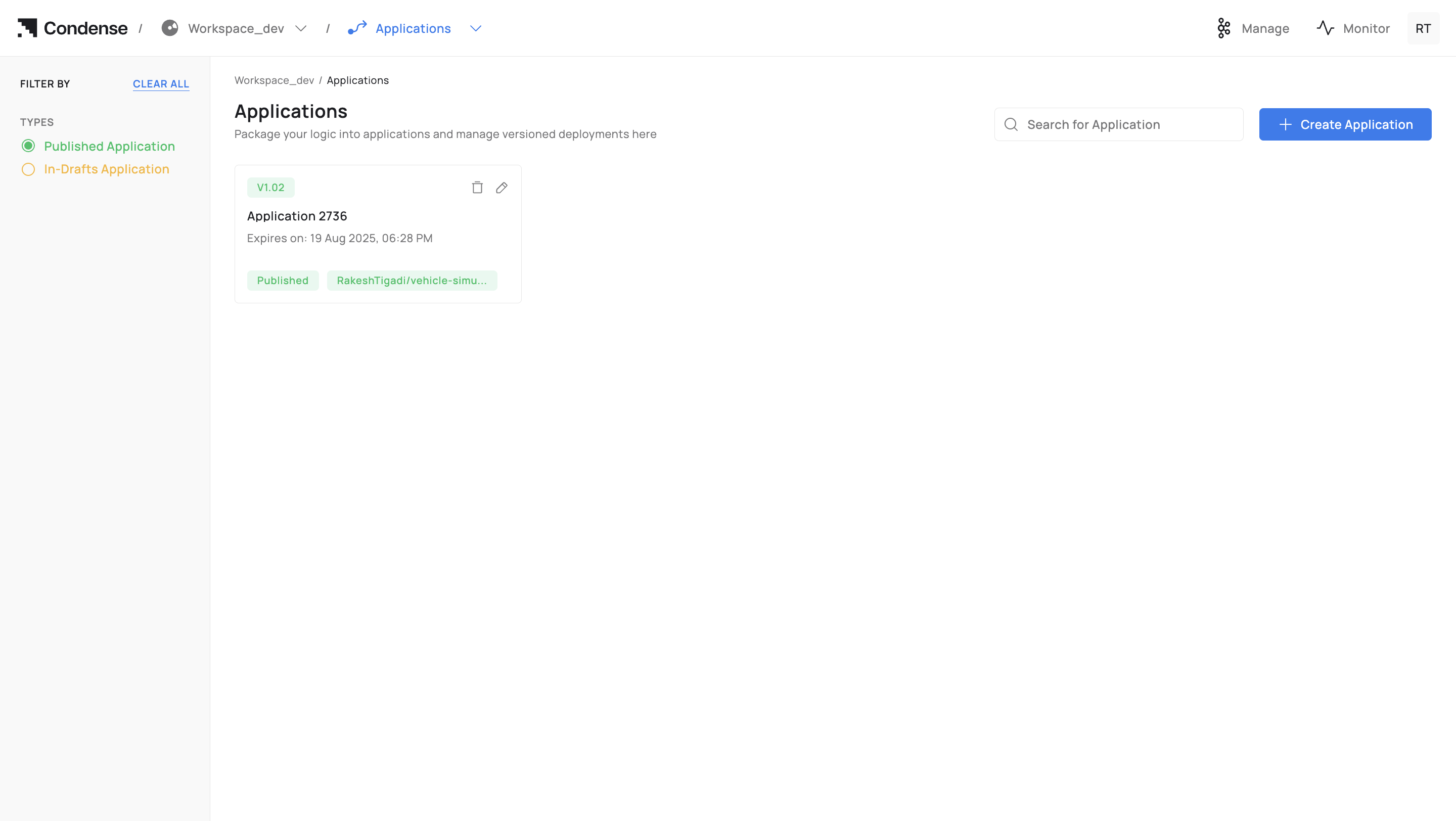
* Custom Transform → appears in Transforms → Custom.&#x20;
* Custom Connector (Input/Output) → appears in Connectors → Custom under the respective role.&#x20;

Steps to publish the application:&#x20;

1. Click Publish Application.&#x20;
2. Confirm Publish as a custom type (Transform / Input Connector / Output Connector).&#x20;
3. Confirm Version and optional release notes.&#x20;
4. Click Publish.&#x20;

<div data-with-frame="true"><figure><img src="https://content.gitbook.com/content/rwKRGO3QthZ6EMqqYblg/blobs/QZSnO6DOWMWE86loJzf8/image.png" alt=""><figcaption></figcaption></figure></div>

Versioning is immutable: see [Publishing an Application. ](#publishing-an-application)

### 5) Deploy the Published Artefact (reference)&#x20;

Deployment happens outside Applications:&#x20;

* **Transforms**: pipeline editor → Add Transform → Custom → choose app/version → configure ENVs/parameters → Deploy.&#x20;
* **Connectors**: Connectors → Custom → choose app → select role (Input/Output) → configure ENVs/parameters → Deploy.&#x20;

Deployment behaviour is covered in the Transforms and Connectors docs.&#x20;

### 6) Update / Roll Back a Version&#x20;

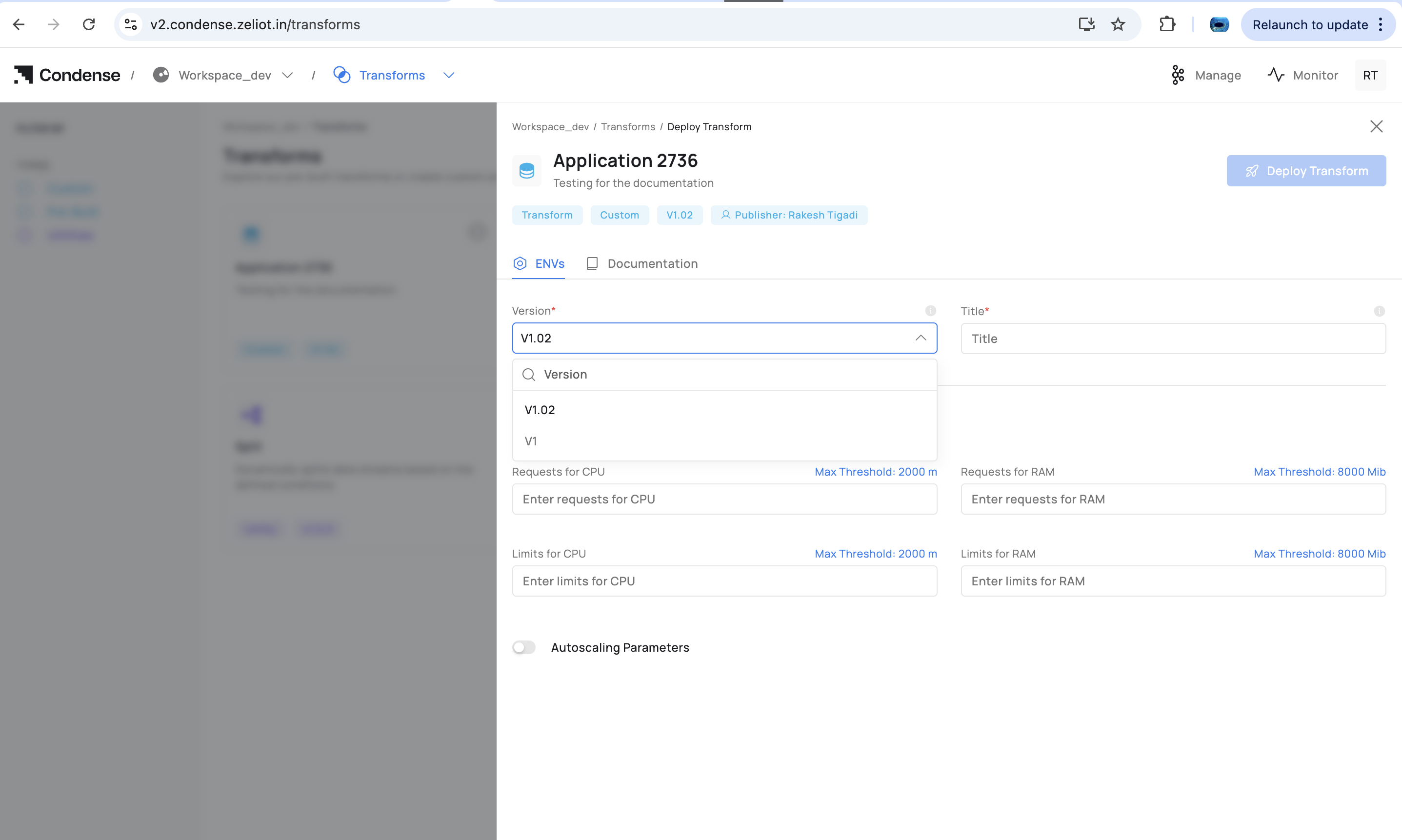
To change logic, update code in Applications, rebuild, and publish a new version. In the deployed transform/connector, switch the Version to the new release (or choose an older one to roll back).&#x20;

Editing deployed parameters happens in the pipeline/connector UI. Editing logic requires a new publish from Applications.&#x20;

#### Edit application

<div data-with-frame="true"><figure><img src="https://content.gitbook.com/content/rwKRGO3QthZ6EMqqYblg/blobs/8qFoieX2LA9ahwKoXKP3/image.png" alt=""><figcaption></figcaption></figure></div>

#### Adding the new version

<div data-with-frame="true"><figure><img src="https://content.gitbook.com/content/rwKRGO3QthZ6EMqqYblg/blobs/GQiIJutNQzBRTNcRJOJ9/image.png" alt=""><figcaption></figcaption></figure></div>

Starting the development of an application involves completing all required steps to build and publish it. After publication, the application appears in the **Transforms** or **Connectors** section, and when deploying a transform or connector in a pipeline, you will be prompted to select the desired version to deploy.

<div data-with-frame="true"><figure><img src="https://content.gitbook.com/content/rwKRGO3QthZ6EMqqYblg/blobs/RWnaFD0eBNhfZqC7MH03/image.png" alt=""><figcaption></figcaption></figure></div>

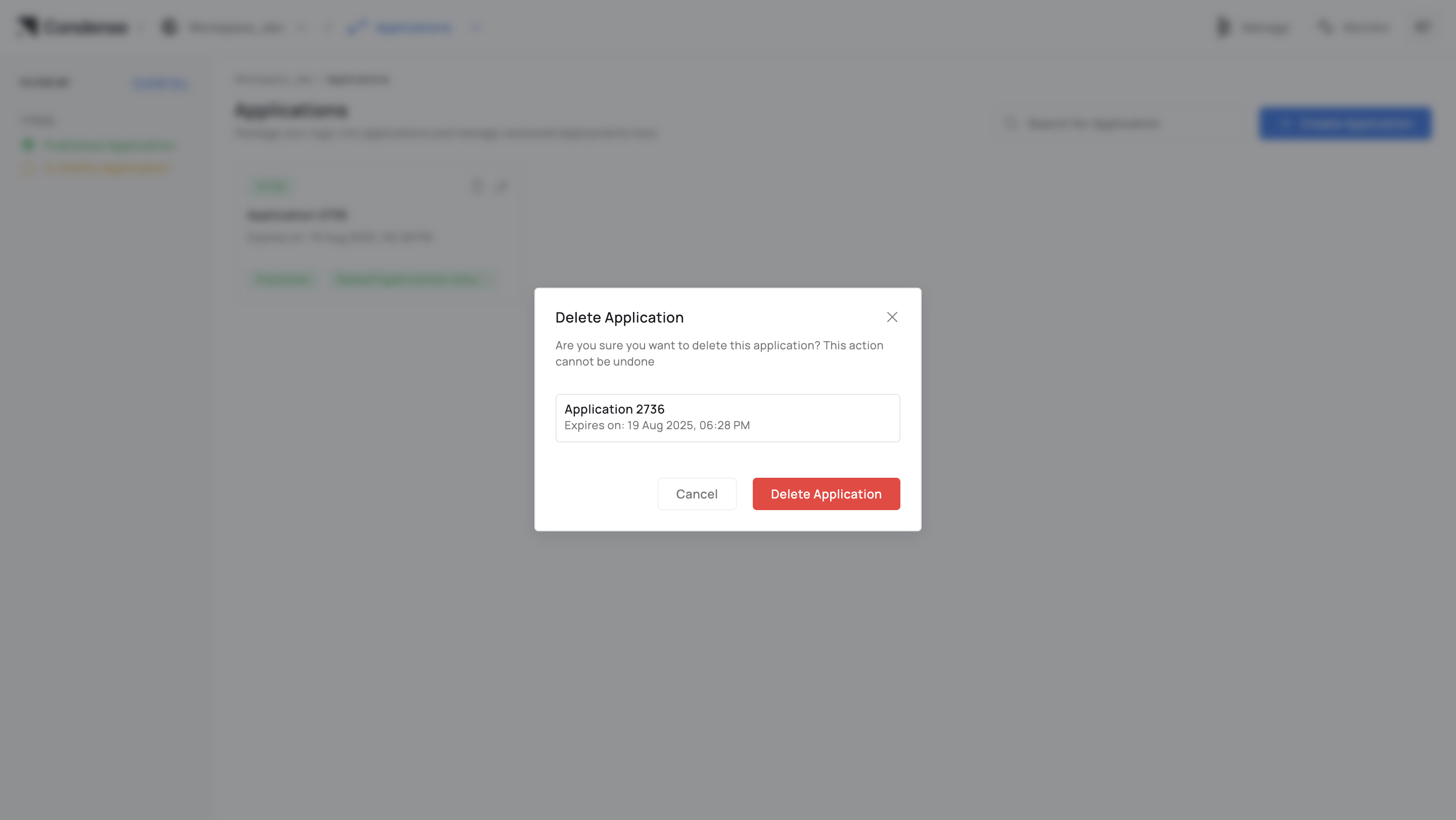
### 7) Deleting an Application&#x20;

Who can delete: Admins (and Maintainers if policy allows) \
Warning: Deletion is irreversible. If a published Application is referenced by a transform/connector in a pipeline, update or remove that deployment first to avoid runtime errors.&#x20;

### Naming Rules&#x20;

* Allowed: only letters in lowercase
* Length: 3–63 characters.&#x20;
* Must be unique within the workspace.&#x20;

### Editing an Application&#x20;

Who can edit: Admins, Maintainers, Developers&#x20;

Editable (drafts):&#x20;

* Source code in the IDE&#x20;
* ENVs (environment variables)&#x20;
* Expose HTTP(s)/TCP server toggles&#x20;
* Description, icon, and version (for drafts)&#x20;
* Repository/branch (until the first build against a commit)&#x20;

Non‑editable:&#x20;

* Application ID&#x20;
* Creation timestamp&#x20;

Note: After publishing, logic changes require a new version (edit → build → publish). Deployed components can switch versions without a rebuild.&#x20;

## IDE Structure&#x20;

* File Explorer (left): navigate and manage files&#x20;
* Code Editor (center): code, linting, errors&#x20;
* ENVs panel (side): runtime configuration, secrets masked&#x20;
* Test Your Application: Publish and Subscribe testers&#x20;
* Build Application: opens image name/tag dialogue&#x20;

## Building an Application&#x20;

Who can build: Admins, Maintainers, Developers&#x20;

Steps to build an application:&#x20;

1. Build Application → enter Docker Image Name and Tag.&#x20;
2. Monitor Build Logs; on failure, review errors, fix code/ENVs/Dockerfile, and rebuild.&#x20;

{% hint style="info" %}
Notes&#x20;

* Use a fully qualified image name for external registries.&#x20;
* Some registries enforce lowercase tags; prefer lowercase alphanumerics, dots, and dashes.&#x20;
* Pass secrets via ENVs; do not bake them into the image.&#x20;
  {% endhint %}

<div data-with-frame="true"><figure><img src="https://content.gitbook.com/content/rwKRGO3QthZ6EMqqYblg/blobs/a5ewXYFVnVZyrXG6fW7g/image.png" alt=""><figcaption></figcaption></figure></div>

## Publishing an Application&#x20;

Who can publish: Admins, Maintainers&#x20;

Publish Targets&#x20;

* Custom Transform: listed under Transforms → Custom for pipeline use.&#x20;
* Custom Connector (Input/Output): listed under Connectors → Custom according to your implementation.&#x20;

Post‑publish&#x20;

* Published versions are immutable.&#x20;
* To change logic, edit → build → publish a new version.&#x20;
* Deployed components can be switched to a new version from their configuration.&#x20;

<div data-with-frame="true"><figure><img src="https://content.gitbook.com/content/rwKRGO3QthZ6EMqqYblg/blobs/1ljFxNCNUVqgrjjgKjar/image.png" alt=""><figcaption></figcaption></figure></div>

## Deleting an Application&#x20;

Who can delete: Admins (Maintainers if your policy allows)&#x20;

Warning&#x20;

* Irreversible in Condense.&#x20;
* If referenced by any deployment, update/remove those deployments first.&#x20;

<div data-with-frame="true"><figure><img src="https://content.gitbook.com/content/rwKRGO3QthZ6EMqqYblg/blobs/xl8fnAfNiU6JoY0Vo2RD/image.png" alt=""><figcaption></figcaption></figure></div>

## Configuration Parameters&#x20;

A. Creation&#x20;

<table><thead><tr><th width="137.2265625" align="center">Field</th><th width="162.7109375" align="center">Description</th><th width="126.375" align="center">Required</th><th align="center">Notes</th></tr></thead><tbody><tr><td align="center">Application Name </td><td align="center">Unique identifier in workspace </td><td align="center">Yes </td><td align="center">3–63 chars; letters, numbers, -, _ </td></tr><tr><td align="center">Publish as a custom </td><td align="center">Publish target at release </td><td align="center">Yes </td><td align="center">Transform / Input Connector / Output Connector </td></tr><tr><td align="center">Version </td><td align="center">Human‑readable version label </td><td align="center">Yes </td><td align="center">e.g., v1, v1.1.2 </td></tr><tr><td align="center">Expiry </td><td align="center">Draft retention period </td><td align="center">Yes </td><td align="center">Draft artifacts auto‑cleaned after expiry </td></tr><tr><td align="center">About </td><td align="center">Description for operators </td><td align="center">No </td><td align="center">Shown in details and summaries </td></tr><tr><td align="center">Git Provider </td><td align="center">Authenticated provider </td><td align="center">Yes </td><td align="center">GitHub / GitLab / Bitbucket </td></tr><tr><td align="center">Repository </td><td align="center">Repository path </td><td align="center">Yes </td><td align="center">Selected from provider after auth </td></tr><tr><td align="center">Branch </td><td align="center">Source branch </td><td align="center">Yes </td><td align="center">Changeable until first build </td></tr></tbody></table>

<div data-with-frame="true"><figure><img src="https://content.gitbook.com/content/rwKRGO3QthZ6EMqqYblg/blobs/mFGssTQIiiJpZHXpA5tz/image.png" alt=""><figcaption></figcaption></figure></div>

## B. Development (Step 2: IDE)&#x20;

<table data-header-hidden><thead><tr><th align="center" valign="middle"></th><th align="center"></th><th align="center"></th></tr></thead><tbody><tr><td align="center" valign="middle"><strong>Element</strong> </td><td align="center"><strong>Description</strong> </td><td align="center"><strong>Notes</strong> </td></tr><tr><td align="center" valign="middle">File Explorer </td><td align="center">Navigate/edit files </td><td align="center">Supports multi‑file edits </td></tr><tr><td align="center" valign="middle">Code Editor </td><td align="center">Inline linting &#x26; errors </td><td align="center">Commit to Git with message </td></tr><tr><td align="center" valign="middle">ENVs </td><td align="center">Runtime configuration </td><td align="center">Secrets supported; values masked </td></tr><tr><td align="center" valign="middle">Expose HTTP(s) </td><td align="center">Enable HTTPS endpoint </td><td align="center">App must bind to configured port </td></tr><tr><td align="center" valign="middle">Expose TCP </td><td align="center">Enable TCP endpoint </td><td align="center">For stream/socket prototyping </td></tr><tr><td align="center" valign="middle">Publish </td><td align="center">Send a test message </td><td align="center">Topic, key/value, format, partition </td></tr><tr><td align="center" valign="middle">Subscribe </td><td align="center">Fetch messages </td><td align="center">Topic, partition, offset/size presets </td></tr><tr><td align="center" valign="middle">Build Application </td><td align="center">Image name &#x26; tag </td><td align="center">Opens build modal </td></tr></tbody></table>

<div data-with-frame="true"><figure><img src="https://content.gitbook.com/content/rwKRGO3QthZ6EMqqYblg/blobs/lP7igLT3rs11UcWO13B3/image.png" alt=""><figcaption></figcaption></figure></div>

## C. Build (Step 3)&#x20;

|     **Field**     |   **Description**   | **Required** |              **Notes**              |
| :---------------: | :-----------------: | :----------: | :---------------------------------: |
| Docker Image Name |  Registry/repo path |      Yes     |   e.g., registry/acme/vehicle-app   |
|        Tag        |      Image tag      |      Yes     |  Align with Version (e.g., v1.0.0)  |
|        Logs       | Build output stream |       —      | Downloadable; success/failure pills |

Summary Pane (left): provider, repo, branch; detected language/runtime; app name/type (Transform/Connector); version; About; configured ENVs (masked); flags for exposed servers.&#x20;

<div data-with-frame="true"><figure><img src="https://content.gitbook.com/content/rwKRGO3QthZ6EMqqYblg/blobs/RI84kWZgXSiYrCS9pWvE/image.png" alt=""><figcaption></figcaption></figure></div>

<div data-with-frame="true"><figure><img src="https://content.gitbook.com/content/rwKRGO3QthZ6EMqqYblg/blobs/UJQam7w76yjsxPLJwY4P/image.png" alt=""><figcaption></figcaption></figure></div>

## D. Publish&#x20;

|      **Field**      |       **Description**      | **Required** |            **Notes**           |
| :-----------------: | :------------------------: | :----------: | :----------------------------: |
| Publish as a custom | Transform / Connector type |      Yes     | Determines catalog destination |
|       Version       |       Release version      |      Yes     |     Immutable after publish    |
|        Notes        |        Release notes       |      No      |     For operators/reviewers    |

<div data-with-frame="true"><figure><img src="https://content.gitbook.com/content/rwKRGO3QthZ6EMqqYblg/blobs/ai1WpxJ8kykJp4KomcCg/image.png" alt=""><figcaption></figcaption></figure></div>

## Roles and Permissions (Applications)&#x20;

|         Operation        |                                                                                                                          Admin                                                                                                                         |                                                                                                                        Maintainer                                                                                                                        |                                                                                                                        Developer                                                                                                                       |                                                                                                                         Viewer                                                                                                                         |
| :----------------------: | :----------------------------------------------------------------------------------------------------------------------------------------------------------------------------------------------------------------------------------------------------: | :------------------------------------------------------------------------------------------------------------------------------------------------------------------------------------------------------------------------------------------------------: | :----------------------------------------------------------------------------------------------------------------------------------------------------------------------------------------------------------------------------------------------------: | :----------------------------------------------------------------------------------------------------------------------------------------------------------------------------------------------------------------------------------------------------: |
|    Create application    | <img src="https://3716651141-files.gitbook.io/~/files/v0/b/gitbook-x-prod.appspot.com/o/spaces%2FrwKRGO3QthZ6EMqqYblg%2Fuploads%2Fvzb7BqqdPegDEdjO8T5c%2Fimage.png?alt=media&#x26;token=bb9b9c73-cbc2-40f9-8453-37cdfa98fb04" alt="" data-size="line"> |  <img src="https://3716651141-files.gitbook.io/~/files/v0/b/gitbook-x-prod.appspot.com/o/spaces%2FrwKRGO3QthZ6EMqqYblg%2Fuploads%2Fvzb7BqqdPegDEdjO8T5c%2Fimage.png?alt=media&#x26;token=bb9b9c73-cbc2-40f9-8453-37cdfa98fb04" alt="" data-size="line">  | <img src="https://3716651141-files.gitbook.io/~/files/v0/b/gitbook-x-prod.appspot.com/o/spaces%2FrwKRGO3QthZ6EMqqYblg%2Fuploads%2Fvzb7BqqdPegDEdjO8T5c%2Fimage.png?alt=media&#x26;token=bb9b9c73-cbc2-40f9-8453-37cdfa98fb04" alt="" data-size="line"> | <img src="https://3716651141-files.gitbook.io/~/files/v0/b/gitbook-x-prod.appspot.com/o/spaces%2FrwKRGO3QthZ6EMqqYblg%2Fuploads%2Fr2zbjtbFoQojuTTPJ3Rg%2Fimage.png?alt=media&#x26;token=c1acde9c-43f4-4e3d-b218-a1a79a744a2a" alt="" data-size="line"> |
|     Edit code / ENVs     | <img src="https://3716651141-files.gitbook.io/~/files/v0/b/gitbook-x-prod.appspot.com/o/spaces%2FrwKRGO3QthZ6EMqqYblg%2Fuploads%2Fvzb7BqqdPegDEdjO8T5c%2Fimage.png?alt=media&#x26;token=bb9b9c73-cbc2-40f9-8453-37cdfa98fb04" alt="" data-size="line"> |  <img src="https://3716651141-files.gitbook.io/~/files/v0/b/gitbook-x-prod.appspot.com/o/spaces%2FrwKRGO3QthZ6EMqqYblg%2Fuploads%2Fvzb7BqqdPegDEdjO8T5c%2Fimage.png?alt=media&#x26;token=bb9b9c73-cbc2-40f9-8453-37cdfa98fb04" alt="" data-size="line">  | <img src="https://3716651141-files.gitbook.io/~/files/v0/b/gitbook-x-prod.appspot.com/o/spaces%2FrwKRGO3QthZ6EMqqYblg%2Fuploads%2Fvzb7BqqdPegDEdjO8T5c%2Fimage.png?alt=media&#x26;token=bb9b9c73-cbc2-40f9-8453-37cdfa98fb04" alt="" data-size="line"> | <img src="https://3716651141-files.gitbook.io/~/files/v0/b/gitbook-x-prod.appspot.com/o/spaces%2FrwKRGO3QthZ6EMqqYblg%2Fuploads%2Fr2zbjtbFoQojuTTPJ3Rg%2Fimage.png?alt=media&#x26;token=c1acde9c-43f4-4e3d-b218-a1a79a744a2a" alt="" data-size="line"> |
|   Use Publish/Subscribe  | <img src="https://3716651141-files.gitbook.io/~/files/v0/b/gitbook-x-prod.appspot.com/o/spaces%2FrwKRGO3QthZ6EMqqYblg%2Fuploads%2Fvzb7BqqdPegDEdjO8T5c%2Fimage.png?alt=media&#x26;token=bb9b9c73-cbc2-40f9-8453-37cdfa98fb04" alt="" data-size="line"> |  <img src="https://3716651141-files.gitbook.io/~/files/v0/b/gitbook-x-prod.appspot.com/o/spaces%2FrwKRGO3QthZ6EMqqYblg%2Fuploads%2Fvzb7BqqdPegDEdjO8T5c%2Fimage.png?alt=media&#x26;token=bb9b9c73-cbc2-40f9-8453-37cdfa98fb04" alt="" data-size="line">  | <img src="https://3716651141-files.gitbook.io/~/files/v0/b/gitbook-x-prod.appspot.com/o/spaces%2FrwKRGO3QthZ6EMqqYblg%2Fuploads%2Fvzb7BqqdPegDEdjO8T5c%2Fimage.png?alt=media&#x26;token=bb9b9c73-cbc2-40f9-8453-37cdfa98fb04" alt="" data-size="line"> | <img src="https://3716651141-files.gitbook.io/~/files/v0/b/gitbook-x-prod.appspot.com/o/spaces%2FrwKRGO3QthZ6EMqqYblg%2Fuploads%2Fr2zbjtbFoQojuTTPJ3Rg%2Fimage.png?alt=media&#x26;token=c1acde9c-43f4-4e3d-b218-a1a79a744a2a" alt="" data-size="line"> |
|     Build application    | <img src="https://3716651141-files.gitbook.io/~/files/v0/b/gitbook-x-prod.appspot.com/o/spaces%2FrwKRGO3QthZ6EMqqYblg%2Fuploads%2Fvzb7BqqdPegDEdjO8T5c%2Fimage.png?alt=media&#x26;token=bb9b9c73-cbc2-40f9-8453-37cdfa98fb04" alt="" data-size="line"> |  <img src="https://3716651141-files.gitbook.io/~/files/v0/b/gitbook-x-prod.appspot.com/o/spaces%2FrwKRGO3QthZ6EMqqYblg%2Fuploads%2Fvzb7BqqdPegDEdjO8T5c%2Fimage.png?alt=media&#x26;token=bb9b9c73-cbc2-40f9-8453-37cdfa98fb04" alt="" data-size="line">  | <img src="https://3716651141-files.gitbook.io/~/files/v0/b/gitbook-x-prod.appspot.com/o/spaces%2FrwKRGO3QthZ6EMqqYblg%2Fuploads%2Fvzb7BqqdPegDEdjO8T5c%2Fimage.png?alt=media&#x26;token=bb9b9c73-cbc2-40f9-8453-37cdfa98fb04" alt="" data-size="line"> | <img src="https://3716651141-files.gitbook.io/~/files/v0/b/gitbook-x-prod.appspot.com/o/spaces%2FrwKRGO3QthZ6EMqqYblg%2Fuploads%2Fr2zbjtbFoQojuTTPJ3Rg%2Fimage.png?alt=media&#x26;token=c1acde9c-43f4-4e3d-b218-a1a79a744a2a" alt="" data-size="line"> |
|    Publish application   | <img src="https://3716651141-files.gitbook.io/~/files/v0/b/gitbook-x-prod.appspot.com/o/spaces%2FrwKRGO3QthZ6EMqqYblg%2Fuploads%2Fvzb7BqqdPegDEdjO8T5c%2Fimage.png?alt=media&#x26;token=bb9b9c73-cbc2-40f9-8453-37cdfa98fb04" alt="" data-size="line"> |  <img src="https://3716651141-files.gitbook.io/~/files/v0/b/gitbook-x-prod.appspot.com/o/spaces%2FrwKRGO3QthZ6EMqqYblg%2Fuploads%2Fvzb7BqqdPegDEdjO8T5c%2Fimage.png?alt=media&#x26;token=bb9b9c73-cbc2-40f9-8453-37cdfa98fb04" alt="" data-size="line">  | <img src="https://3716651141-files.gitbook.io/~/files/v0/b/gitbook-x-prod.appspot.com/o/spaces%2FrwKRGO3QthZ6EMqqYblg%2Fuploads%2Fr2zbjtbFoQojuTTPJ3Rg%2Fimage.png?alt=media&#x26;token=c1acde9c-43f4-4e3d-b218-a1a79a744a2a" alt="" data-size="line"> | <img src="https://3716651141-files.gitbook.io/~/files/v0/b/gitbook-x-prod.appspot.com/o/spaces%2FrwKRGO3QthZ6EMqqYblg%2Fuploads%2Fr2zbjtbFoQojuTTPJ3Rg%2Fimage.png?alt=media&#x26;token=c1acde9c-43f4-4e3d-b218-a1a79a744a2a" alt="" data-size="line"> |
|    Delete application    | <img src="https://3716651141-files.gitbook.io/~/files/v0/b/gitbook-x-prod.appspot.com/o/spaces%2FrwKRGO3QthZ6EMqqYblg%2Fuploads%2Fvzb7BqqdPegDEdjO8T5c%2Fimage.png?alt=media&#x26;token=bb9b9c73-cbc2-40f9-8453-37cdfa98fb04" alt="" data-size="line"> | <img src="https://3716651141-files.gitbook.io/~/files/v0/b/gitbook-x-prod.appspot.com/o/spaces%2FrwKRGO3QthZ6EMqqYblg%2Fuploads%2Fvzb7BqqdPegDEdjO8T5c%2Fimage.png?alt=media&#x26;token=bb9b9c73-cbc2-40f9-8453-37cdfa98fb04" alt="" data-size="line">\* | <img src="https://3716651141-files.gitbook.io/~/files/v0/b/gitbook-x-prod.appspot.com/o/spaces%2FrwKRGO3QthZ6EMqqYblg%2Fuploads%2Fr2zbjtbFoQojuTTPJ3Rg%2Fimage.png?alt=media&#x26;token=c1acde9c-43f4-4e3d-b218-a1a79a744a2a" alt="" data-size="line"> | <img src="https://3716651141-files.gitbook.io/~/files/v0/b/gitbook-x-prod.appspot.com/o/spaces%2FrwKRGO3QthZ6EMqqYblg%2Fuploads%2Fr2zbjtbFoQojuTTPJ3Rg%2Fimage.png?alt=media&#x26;token=c1acde9c-43f4-4e3d-b218-a1a79a744a2a" alt="" data-size="line"> |
|  View applications list  | <img src="https://3716651141-files.gitbook.io/~/files/v0/b/gitbook-x-prod.appspot.com/o/spaces%2FrwKRGO3QthZ6EMqqYblg%2Fuploads%2Fvzb7BqqdPegDEdjO8T5c%2Fimage.png?alt=media&#x26;token=bb9b9c73-cbc2-40f9-8453-37cdfa98fb04" alt="" data-size="line"> |  <img src="https://3716651141-files.gitbook.io/~/files/v0/b/gitbook-x-prod.appspot.com/o/spaces%2FrwKRGO3QthZ6EMqqYblg%2Fuploads%2Fvzb7BqqdPegDEdjO8T5c%2Fimage.png?alt=media&#x26;token=bb9b9c73-cbc2-40f9-8453-37cdfa98fb04" alt="" data-size="line">  | <img src="https://3716651141-files.gitbook.io/~/files/v0/b/gitbook-x-prod.appspot.com/o/spaces%2FrwKRGO3QthZ6EMqqYblg%2Fuploads%2Fvzb7BqqdPegDEdjO8T5c%2Fimage.png?alt=media&#x26;token=bb9b9c73-cbc2-40f9-8453-37cdfa98fb04" alt="" data-size="line"> | <img src="https://3716651141-files.gitbook.io/~/files/v0/b/gitbook-x-prod.appspot.com/o/spaces%2FrwKRGO3QthZ6EMqqYblg%2Fuploads%2Fvzb7BqqdPegDEdjO8T5c%2Fimage.png?alt=media&#x26;token=bb9b9c73-cbc2-40f9-8453-37cdfa98fb04" alt="" data-size="line"> |
| View application details | <img src="https://3716651141-files.gitbook.io/~/files/v0/b/gitbook-x-prod.appspot.com/o/spaces%2FrwKRGO3QthZ6EMqqYblg%2Fuploads%2Fvzb7BqqdPegDEdjO8T5c%2Fimage.png?alt=media&#x26;token=bb9b9c73-cbc2-40f9-8453-37cdfa98fb04" alt="" data-size="line"> |  <img src="https://3716651141-files.gitbook.io/~/files/v0/b/gitbook-x-prod.appspot.com/o/spaces%2FrwKRGO3QthZ6EMqqYblg%2Fuploads%2Fvzb7BqqdPegDEdjO8T5c%2Fimage.png?alt=media&#x26;token=bb9b9c73-cbc2-40f9-8453-37cdfa98fb04" alt="" data-size="line">  | <img src="https://3716651141-files.gitbook.io/~/files/v0/b/gitbook-x-prod.appspot.com/o/spaces%2FrwKRGO3QthZ6EMqqYblg%2Fuploads%2Fvzb7BqqdPegDEdjO8T5c%2Fimage.png?alt=media&#x26;token=bb9b9c73-cbc2-40f9-8453-37cdfa98fb04" alt="" data-size="line"> | <img src="https://3716651141-files.gitbook.io/~/files/v0/b/gitbook-x-prod.appspot.com/o/spaces%2FrwKRGO3QthZ6EMqqYblg%2Fuploads%2Fvzb7BqqdPegDEdjO8T5c%2Fimage.png?alt=media&#x26;token=bb9b9c73-cbc2-40f9-8453-37cdfa98fb04" alt="" data-size="line"> |

\* Maintainer deletion depends on your organization’s policy.&#x20;

### Role descriptions&#x20;

* Admin: Full lifecycle control and governance.&#x20;
* Maintainer: Operates lifecycle (develop/build/publish) but not workspace settings.&#x20;
* Developer: Develops and builds; cannot publish or delete.&#x20;
* Viewer: Read‑only.&#x20;

## Monitoring and Audit&#x20;

* Build Logs: full build output with success/failure indicators.&#x20;
* Runtime Logs (when deployed): stdout/stderr available via Logger/observability stack.&#x20;
* Version History: immutable publish records (version, author, timestamp).&#x20;
* Activity Log: who created, edited, built, published, or deleted the Application.&#x20;

## Best Practices&#x20;

* Single responsibility: keep each Application focused for simpler testing and review.&#x20;
* ENVs over hardcoding: configure ports, credentials, and endpoints via environment variables.&#x20;
* Stable branches: map branches to stages (dev, staging, main).&#x20;
* Tag discipline: align Version, image tag, and Git tag/commit for traceability.&#x20;
* Test early: use Publish/Subscribe testers before builds to catch schema/mapping issues.&#x20;
* Minimize image size: prefer slim base images for faster builds and deploys.&#x20;

## Common Pitfalls and How to Avoid Them&#x20;

* Published artefact not visible for deployment \
  **Cause**: Wrong publication as a custom choice. \
  **Avoidance**: Confirm the Transform vs Input/Output Connector before publishing.&#x20;
* Unreachable HTTP/TCP during testing \
  **Cause**: Server not exposed or wrong port binding. \
  **Avoidance**: Enable the correct toggle and match the port ENV in code.&#x20;
* “No messages yet” in Subscribe \
  **Cause**: Topic/partition/offset mismatch or too small a fetch window. \
  **Avoidance**: Use First/Last/Size presets and verify topic + partition.&#x20;
* Build failures due to missing dependencies \
  **Cause**: Dependencies not in project config. \
  **Avoidance**: Add to dependency file (e.g., requirements.txt) and rebuild.&#x20;
* Deleting an Application still referenced by deployments \
  **Cause**: Active transform/connector points to this Application. \
  **Avoidance**: Update or remove dependent deployments first.&#x20;

## Related Links&#x20;

* [Workspaces](https://docs.zeliot.in/condense/v2.4.0/condense-guide/condense-core/create-your-workspace)&#x20;
* [Transforms](https://docs.zeliot.in/condense/v2.4.0/deep-dive/transforms)&#x20;
* [Connectors](https://docs.zeliot.in/condense/v2.4.0/condense-guide/condense-core/deploy-an-input-connector)&#x20;
* [RBAC](https://docs.zeliot.in/condense/v2.4.0/condense-guide/condense-console/roles-and-permissions)